Binspector, a daily limit you can see
My role: Founder, designer, builder. Research, interaction design, design system, Android app built with Claude Code, release and measurement. Status: launching on Google Play, closed testing starts October 2026.
Screen-time apps either block the whole app or show a chart nobody looks at. Binspector does neither: flies start landing on the Instagram feed as you get close to your daily goal, and at the limit they cover it. Your DMs stay clear.
The limit becomes something you see in the moment, not a number you check later. Built solo, on a real phone, version by version.
The problem
People don't want to delete Instagram. Their friends, messages and work live there. What they want gone is the feed that keeps them for an hour when they opened the app to answer one message.
The tools on the market answer with force: block the app, hide Reels, lock you out. People install them, feel guilty, and uninstall them. I wanted to know why before designing anything.
Research: what breaks the existing tools
I collected 1,484 one-to-three-star reviews from the 8 most relevant blockers on Google Play (4 that act inside the app, 4 that block or measure the whole app), in English and Portuguese, and grouped every complaint. What came up most:
| 250 | Price, paywall, subscription. The help is locked behind a payment wall. |
| 105 | Stops working by itself after hours or days. |
| 78 | Battery, lag, crashes. |
| 39 | Hard to set up, confusing interface. |
| 29 | Fear of the accessibility permission and of what the app sees. |
| 27 | "Block the feed, keep my DMs and stories." A request, not a complaint. |
The apps that act inside Instagram break about three times more often than the ones that only stop it from opening. So the product had to be gentle on the host app, honest about the permission, and cheap on the battery, before being clever.
The idea: friction you can see
Instead of a wall, a fly. The first one lands on the feed when you've used 10% of your daily goal. It carries two messages at once: you're in the bin, the part of the app that eats your time, and your time is running out. When a second one shows up, you start thinking. In the last 10% a swarm builds up, and at the limit the screen is covered.
The flies are the clock. The app measures your time to the minute, but it doesn't keep throwing the number at you. You read it by counting flies, without stopping to look at a chart. It works like a mirror: you look at the feed, see the flies, and know you shouldn't be there.
Nothing is blocked. Blocking makes people fight the tool, and then uninstall it. Binspector invites you to leave by making the feed unbearable. You can still go in, but first you kill the fly. I use it every day, and the flies are what get me out: when they show up, I feel I need to leave.
Messages, search and posting don't count toward the limit. Only the time spent on the feed and the algorithm does.
Onboarding: your number before any rule
Before asking for anything, the app shows you your own number. Android already knows how much Instagram takes; the onboarding just reads it back to you. One hour of your day, the heaviest day, and the same pace counted in whole days a year. Only then comes the goal: three steps cut from your average, one recommended, no grade and no label.
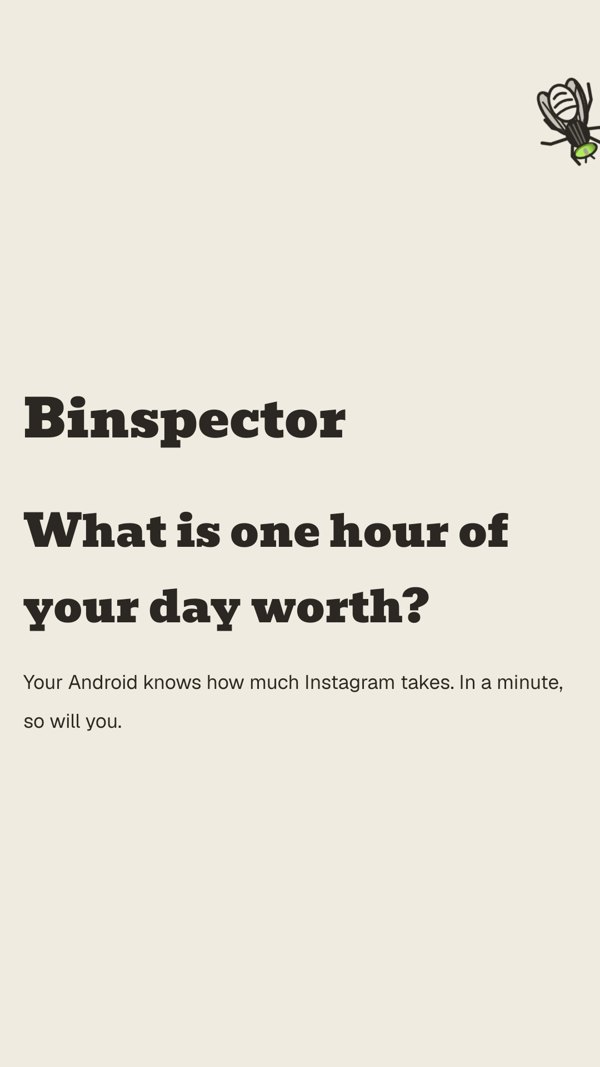
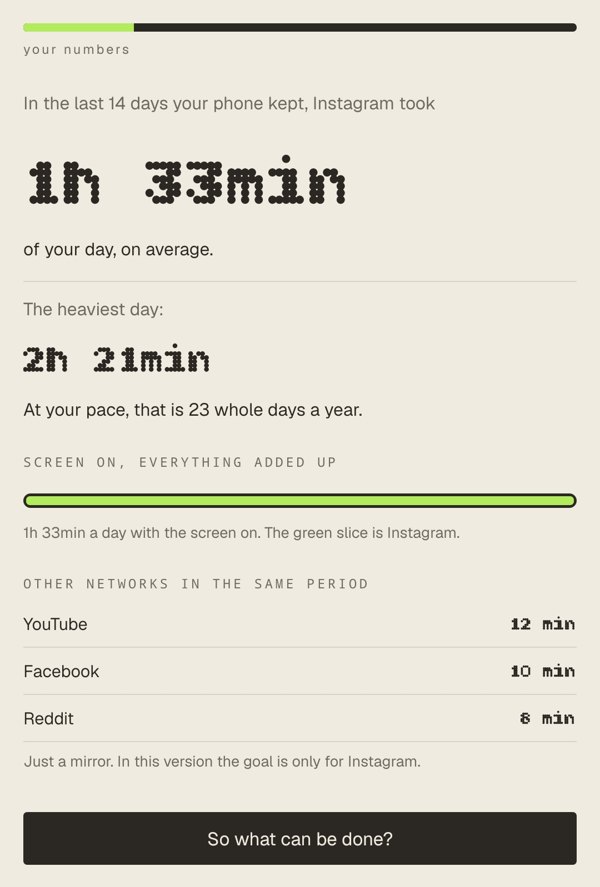
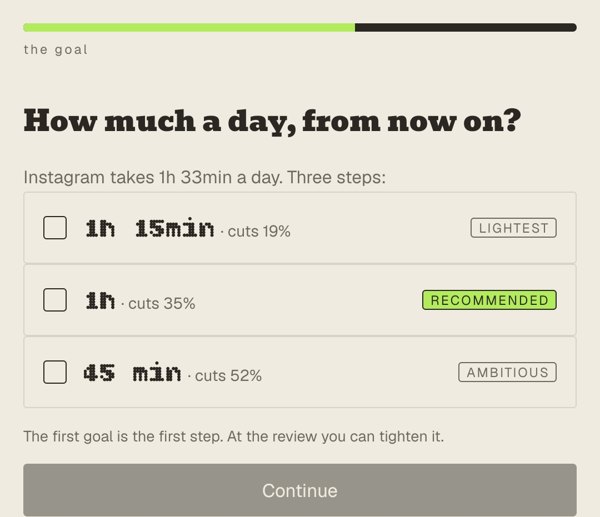

Fig. 04 / Home, current build (v166), on my phone.
The interruptions
Everything that shows up over Instagram is the same card: the name, today's time, and one clear way out. The voice is a mirror, not a judge. The app shows the number and lets you decide; it never scolds.
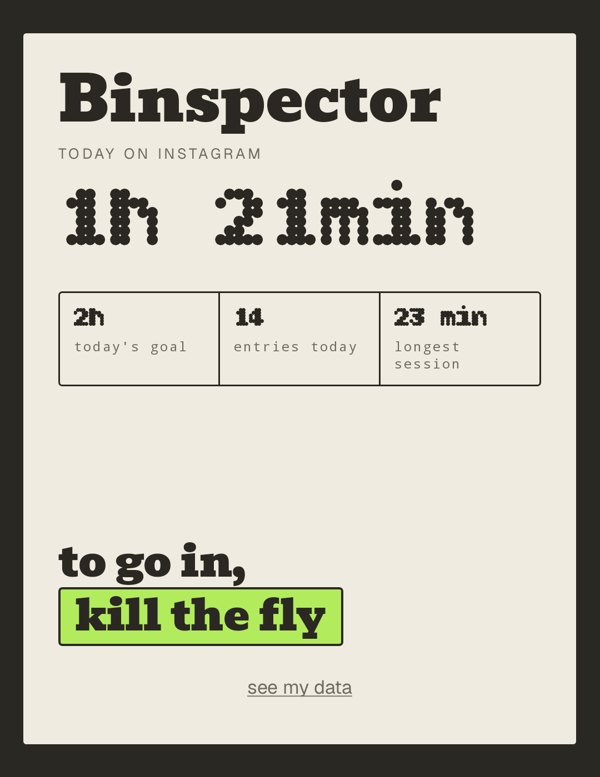
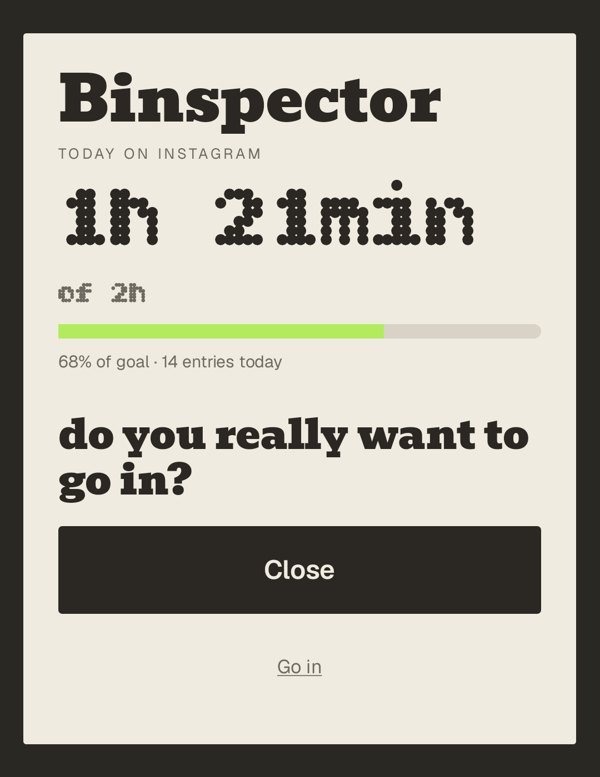
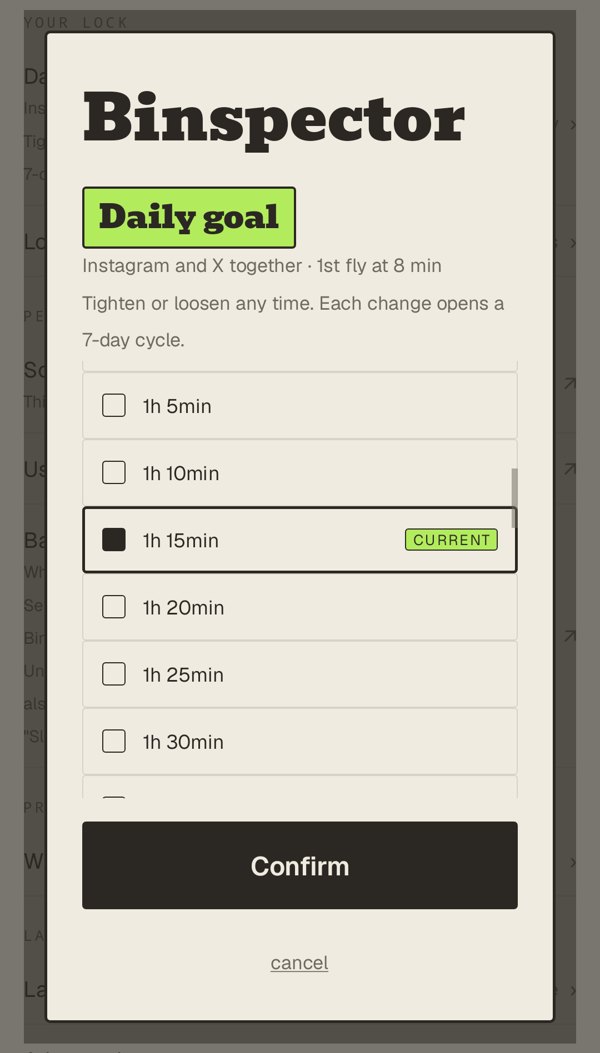
The brand: an inspector for the bin
The name. Bin + inspector. The feed is the bin, and the time you lose there is "time in the bin". The app doesn't preach about it; it inspects, like someone checking what you threw away today.
The colours. Five warm greys, from paper to ink, carry the whole interface. The app that fights for your attention can't be another loud app, so it stays quiet on purpose. Green is the only colour, a sour, rotten green that belongs to the bin and to the fly's eye. It's used once per screen at most, only on the gesture that gives you something back ("kill the fly"). Never on a button, a number or a bar.
Three typefaces, three voices.
- Bevan is the brand: the name, titles and the questions the app asks. One weight, never bold.
- Bitcount, a dotted display face, is reserved for numbers the phone measured. If it's in Bitcount, Android counted it; the app never uses it for words.
- Geist is everything else, including labels, so the two voices above stay rare and loud.
No shadows, only hairlines. No fourth font. The rules live in a small design system (tokens, components, the three fonts) shared by the HTML prototypes and the Android app.
Designing for trust
The accessibility permission is the scariest screen in this category. Three decisions answer the fear people wrote about in the reviews:
- History stays on the phone. No account, no sync, no backup. The build doesn't even ask for internet access.
- It reads the shape of the screen, not what's written on it. Enough to know you're on the feed, not enough to read your messages.
- Every number comes from Android itself. The time on screen is the same number the phone's own screen-time shows, minus the free areas.
How I built it
Designed and built solo, directing AI agents (Claude Code) to write the Android code. The loop was short and always on a real device:
- Be the first user: I had the problem, so every version runs on my own phone, every day, before anyone else sees it.
- Talk to people who feel it too: short interviews with a few people who struggle with the same feed, and now the first beta testers, starting with people close to me.
- Prototype for real: HTML prototypes approved first, then measured against the app pixel by pixel.
- Define what ships: every change goes out as a written spec with acceptance criteria, so the agent knows what "done" means.
- Ship, measure, learn: each version installed on the phone the same day, measured with the data Android already provides, and fed into the next one.
- A design system of its own: tokens, components and three typefaces shared between the prototypes and the app.
Honest about where it is
The first beta testers are just starting, so there is no data from them yet. The app is on its way to Google Play: the closed test with 12 testers comes first, and Google asks for 14 days of testing before the public release. Everything above was measured on my own device. The next numbers that matter are the testers': do they keep it installed, and does their feed time go down.
Why this case sits here
Binspector is the full loop in one product: research that changed the direction, an interaction that turns a number into something you feel, trust decisions written into the architecture, and a build shipped version by version on a real phone. One person, with AI doing what used to take a team.